
OddsLogic Line Alerts:Get the Line You Want, When It Happens
OddsLogic Line Alerts:
Get the Line You Want, When It Happens
Get notified when the line you're waiting for becomes available
Get notified when the line you're waiting for becomes available
Line Alerts let you monitor a specific event for a line you want to bet.
Set the number you're looking for, and OddsLogic will monitor your selected sportsbooks. When that line - or a better line - becomes available at one of those books, OddsLogic will generate an alert.
This is useful when you like a side or total but want to wait for the market to reach your target instead of continuously watching the screen.
Setting Up Line Alerts
Setting Up Line Alerts
Open Settings → Line Alerts.
Your Line Alerts screen displays all of your current alerts and gives you access to the sportsbooks OddsLogic will monitor.
1. Choose Your Sportsbooks
1. Choose Your Sportsbooks
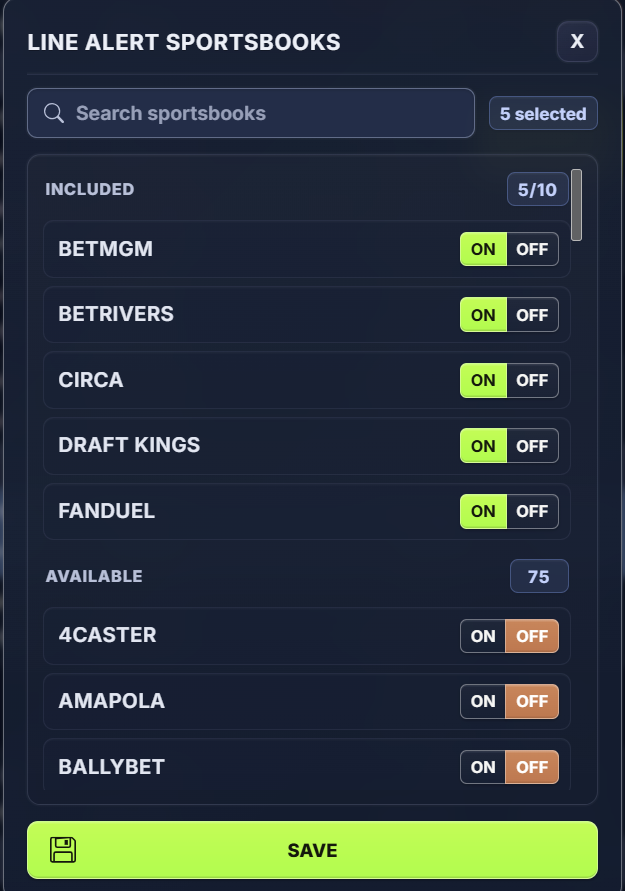
Before creating alerts, click Sportsbooks and select the books you want OddsLogic to monitor.
Turn ON the sportsbooks you have access to and want included in your Line Alerts.
TIP: Select Books You Can Actually Bet With
OddsLogic will look for your target line across the sportsbooks in this list. Selecting the books you regularly use keeps alerts relevant and actionable.
2. Create a New Line Alert
2. Create a New Line Alert
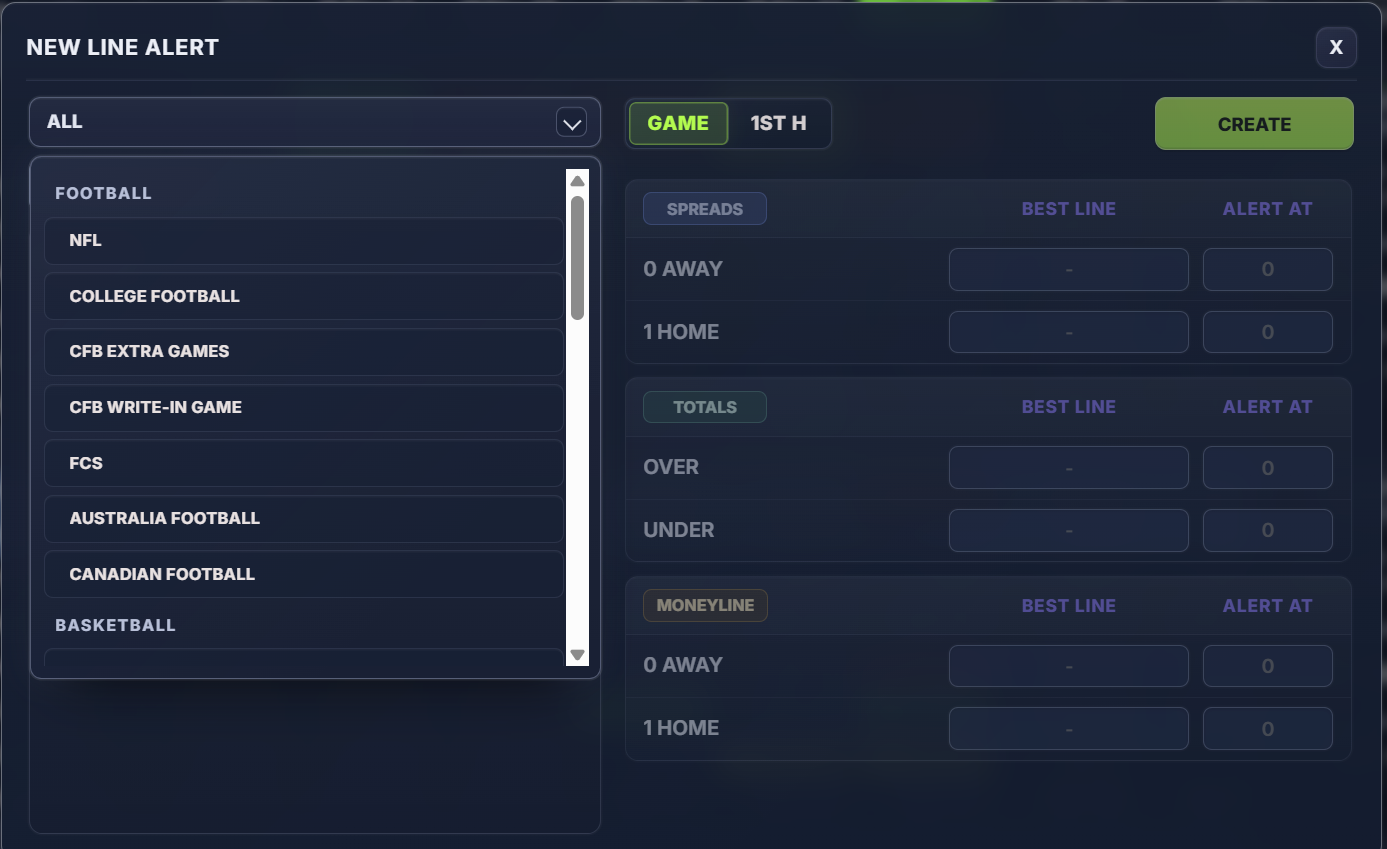
Click New to open the Line Alert setup screen.
Start by selecting the league containing the event you want to monitor.
Once the league is selected, choose the specific event.
3. Select the Game Segment
3. Select the Game Segment
Choose the segment you want to monitor, such as:
- Game
- 1st Half
- Other available segments depending on the sport
The markets displayed will update based on the segment selected.
4. Set Your Target Line
4. Set Your Target Line
For the selected event and segment, OddsLogic displays the available markets, including:
- Spread
- Total
- Moneyline
The Best Line column shows the best line currently available across your selected sportsbooks.
Enter the number you want in the Alert At field for the side or market you want to monitor.
For example, if New England is currently +6 and you want to bet them only if +7 or better becomes available, set your alert at +7.
OddsLogic will then monitor your selected sportsbooks and alert you when +7 or a better number becomes available.
TIP: Set the Number You'd Actually Bet
Line Alerts work best as a watchlist for prices you're willing to act on. Instead of repeatedly checking an event, set your target and let OddsLogic monitor the market for you.
5. Create the Alert
5. Create the Alert
Once you've entered your target line, click Create.
The alert will now appear under Active Line Alerts.
Managing Your Active Alerts
Managing Your Active Alerts
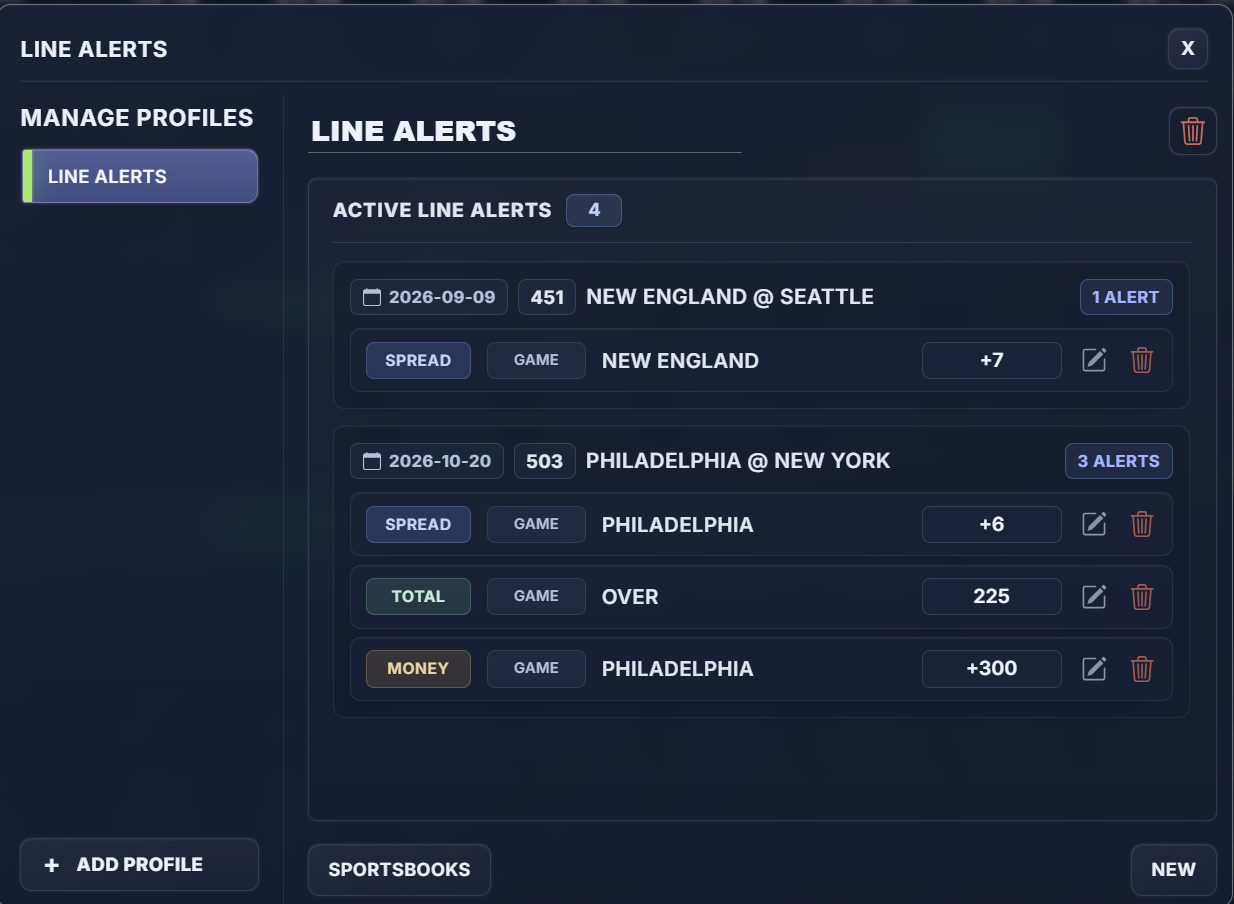
The Line Alerts screen groups your active alerts by event, making it easy to see everything you're currently monitoring.
For each alert, you can see:
- Event
- Market type
- Game segment
- Team or side
- Target line
You can also:
- Edit an alert to change your target
- Delete an individual alert
- Create multiple alerts for the same event
For example, you could simultaneously monitor:
- Philadelphia +6
- Over 225
- Philadelphia Moneyline +300
This allows you to build a complete watchlist around the prices you're looking for.
Using Multiple Line Alerts
Using Multiple Line Alerts
Unlike Sharp Plays, Positive EV, and Arb Alerts, Line Alerts aren't designed to automatically discover opportunities based on a set of market rules.
You tell OddsLogic exactly what you're looking for.
That makes Line Alerts particularly useful for:
- Waiting for a better spread
- Targeting a specific total
- Watching for a desired moneyline price
- Monitoring several potential bets at the same time
- Setting targets well before an event begins
Once your alerts are created, you can continue using OddsLogic normally while the system monitors your selected sportsbooks for the numbers you want.
TIP: Think of Line Alerts as Your Betting Watchlist
If you know the price you want, set the alert and move on. OddsLogic will watch the market and let you know when your number becomes available.
Set your target line, choose the sportsbooks you want monitored, and let OddsLogic watch the market for you.
Advanced: Create Multiple Line Alert Profiles
Advanced: Create Multiple Line Alert Profiles
Line Alert Profiles allow you to create separate groups of alerts, each with its own sportsbook setup.
This is useful when you want to monitor different sets of sportsbooks for different purposes.
For example, you could create profiles for:
- Main Books — sportsbooks you use most often
- Offshore Books — a separate group of offshore sportsbooks
- Local Books — books available in a particular market
- Football — alerts using the books you prefer for football
- Basketball — alerts using a different sportsbook group
To create another profile, click Add Profile, name the profile, and select the sportsbooks you want associated with it.
When creating a Line Alert, use the appropriate profile so OddsLogic knows which group of sportsbooks to monitor for your target line.
Each profile maintains its own Line Alerts, making it easy to organize and manage different watchlists.
TIP: Use Profiles When the Sportsbooks Matter
You don't need multiple profiles just to create multiple Line Alerts. A single profile can contain alerts for many events and markets. Create additional profiles when you want a different sportsbook list or want to keep a separate group of alerts organized together.