
OddsLogic Positive EV Alerts:Find Value Opportunities in Real Time
OddsLogic Positive EV Alerts:
Find Value Opportunities in Real Time
Find value when a sportsbook's price is better than the market
Find value when a sportsbook's price is better than the market
Positive EV Alerts continuously compare available sportsbook odds against a selected market source to identify wagers where the offered price represents positive expected value.
OddsLogic monitors the sportsbooks, leagues, markets, and game segments you select and alerts you when an opportunity meets your EV and edge requirements.
You control how much value is required, which sportsbooks are monitored, which market source is used to determine fair value, and exactly which betting markets are included.
Setting Up Positive EV Alerts
Setting Up Positive EV Alerts
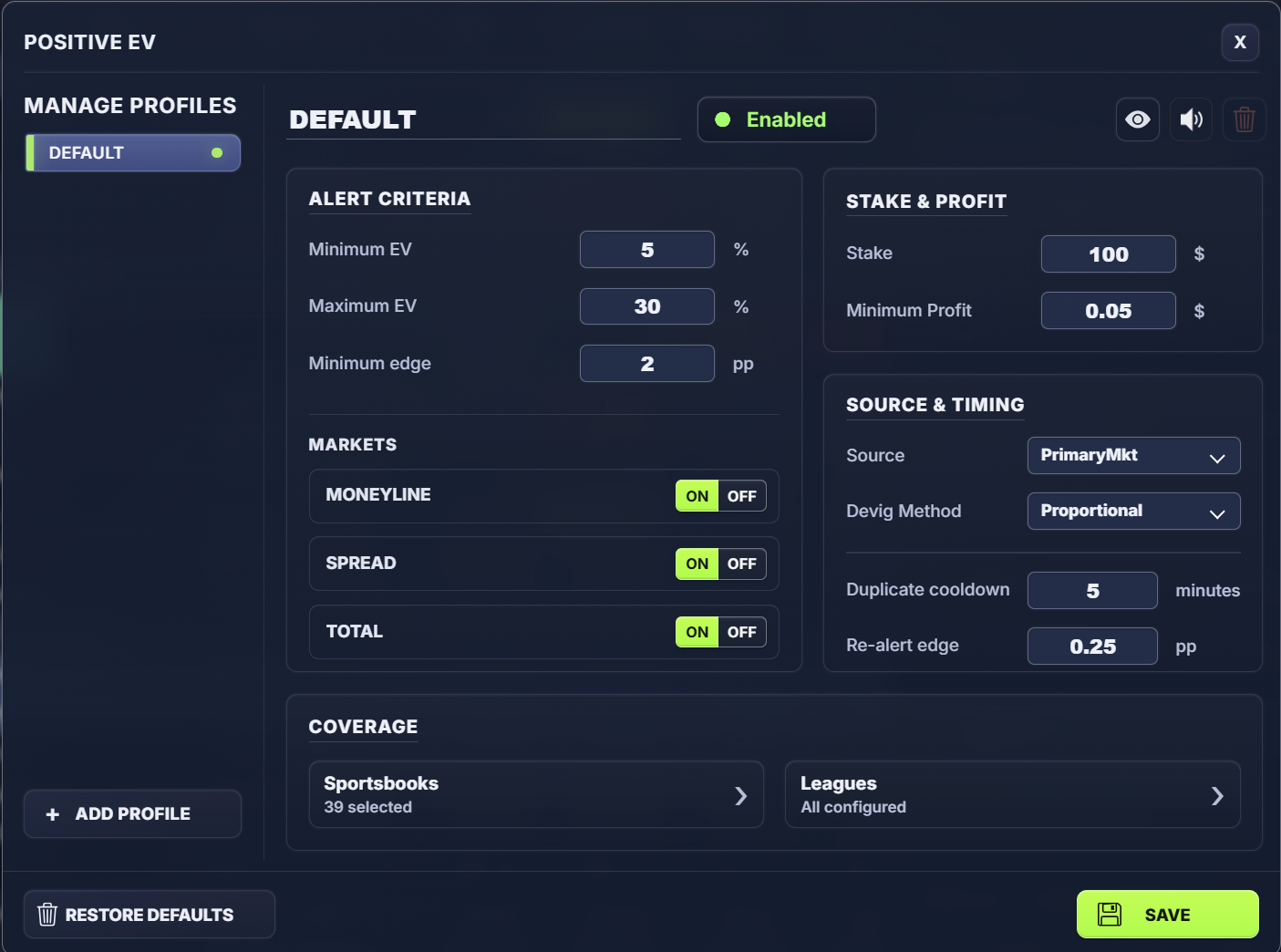
Open Settings → Positive EV. Your Default profile is the starting point for your Positive EV alerts.
1. Set Your Alert Criteria
1. Set Your Alert Criteria
Use Alert Criteria to determine how much value an opportunity must have before OddsLogic generates an alert.
Minimum EV — The minimum expected value percentage required to trigger an alert.
Maximum EV — The maximum EV percentage you want included. This can help filter unusually large opportunities that you don't want included in your alerts.
Minimum Edge — Sets the minimum difference, measured in percentage points (pp), between the fair probability calculated from your source and the implied probability of the offered sportsbook price.
For example, setting Minimum EV to 5% tells OddsLogic to only alert you to opportunities with a calculated EV of at least 5%, subject to your other criteria.
TIP: Use EV and Edge Together
EV measures the expected value of the available wager, while Edge measures the difference between the fair probability and the probability implied by the offered price. Using both gives you additional control over the quality of opportunities that generate alerts.
2. Choose Your Markets
2. Choose Your Markets
Select the market types you want OddsLogic to monitor:
- Moneyline
- Spread
- Total
Turn any market OFF if you don't want it included in the profile.
3. Set Your Stake & Minimum Profit
3. Set Your Stake & Minimum Profit
Stake determines the wager amount OddsLogic uses when calculating and displaying the expected dollar value of an opportunity.
Minimum Profit lets you require a minimum calculated expected profit before generating an alert.
TIP: Stake Is for the Calculation
The Stake setting is used to calculate and display the expected value of the wager. OddsLogic does not automatically place a bet.
4. Choose Your Source & Devig Method
4. Choose Your Source & Devig Method
The Source is the market reference OddsLogic uses to establish the fair probability of each side of the market.
Select the source you want OddsLogic to use, then choose your Devig Method. The devig calculation removes the sportsbook margin from the source odds to estimate fair probabilities.
This fair probability is then compared with prices available at your selected sportsbooks to identify Positive EV opportunities.
TIP: Your Source Matters
Positive EV is only as meaningful as the market reference used to determine fair value. Choose a source that reflects the market you want to use as your benchmark.
5. Control Repeat Alerts
5. Control Repeat Alerts
Positive EV opportunities can change as sportsbook prices and the source market move.
Duplicate Cooldown determines how long OddsLogic waits before sending another alert for the same opportunity.
Re-alert Edge determines how much the edge must improve before OddsLogic generates another alert, subject to your other alert settings.
This helps keep you informed when an opportunity becomes more attractive without repeatedly alerting you to the same price.
6. Choose Your Sportsbooks
6. Choose Your Sportsbooks
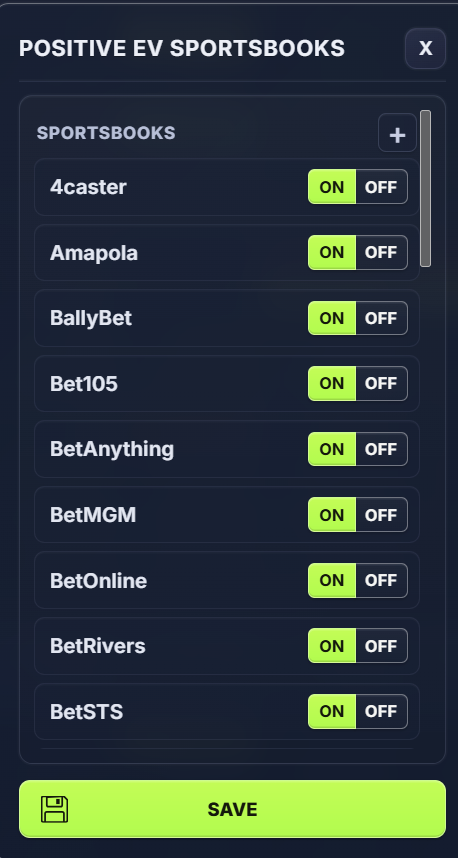
Open Sportsbooks under Coverage and select the sportsbooks where you want OddsLogic to look for Positive EV opportunities.
Unlike Sharp Plays and Arb Alerts, Positive EV does not use Must Include sportsbooks. Every selected sportsbook is a potential location where OddsLogic can identify an qualifying price.
TIP: Select Sportsbooks You Can Actually Bet With
Choose the sportsbooks you have access to and want OddsLogic to monitor. There's little value in receiving a Positive EV alert for an offered price you can't wager on.
6. Choose Your Leagues, Markets & Segments
6. Choose Your Leagues, Markets & Segments
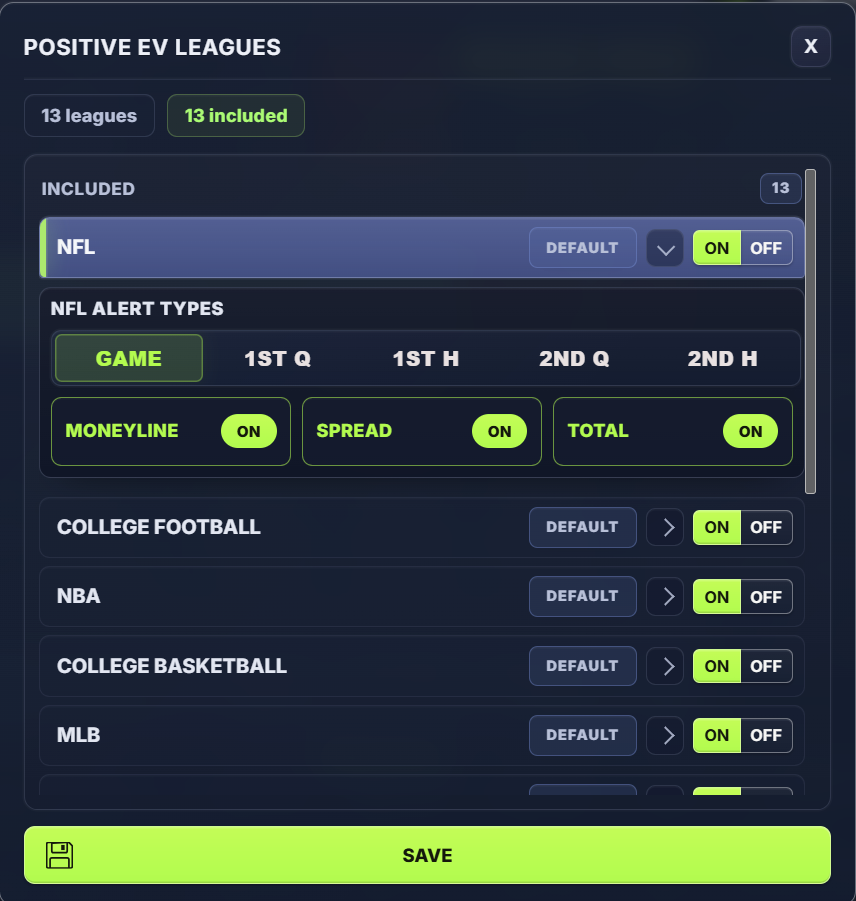
Open Leagues to select the leagues you want monitored.
Just like Sharp Plays, you can include a league and then customize the individual markets and game segments monitored within that league.
This gives you broad or highly specific coverage. For example, one profile could monitor all available NFL markets while another could focus on selected NBA markets and game segments.
Advanced: Create Multiple Positive EV Profiles
Advanced: Create Multiple Positive EV Profiles
Profiles are particularly useful for Positive EV because different sports or betting strategies may call for different sources, EV requirements, sportsbooks, or markets.
Each profile can have its own:
- Minimum and Maximum EV
- Minimum Edge
- Markets
- Stake and Minimum Profit
- Source and Devig Method
- Timing settings
- Sportsbooks
- Leagues, markets, and segments
For example, you could create a dedicated NBA Positive EV profile using a different source or EV threshold than your Default profile.
Turn NBA ON in the NBA profile and OFF in your Default profile so NBA opportunities are evaluated using the settings you've specifically created for that league.
When a Positive EV Opportunity Is Triggered
When a Positive EV Opportunity Is Triggered
When an available price meets the criteria for one of your enabled profiles, OddsLogic displays a Positive EV popup directly on the odds screen.
The alert gives you the information needed to evaluate the opportunity, including the available wager and sportsbook, EV, Edge, fair probability, offered probability, and expected value based on your configured stake.
Review Your Positive EV Alerts
Review Your Positive EV Alerts
You don't have to catch every popup when it appears.
Click the Positive EV icon in the OddsLogic toolbar to view your Positive EV Alerts and review the opportunities that have been generated.
TIP: Start Simple
Start with the sportsbooks you actually use, the leagues and markets you bet, and EV and Edge thresholds you're comfortable with. Once you see the types of opportunities OddsLogic identifies, use Profiles, Sources, Devig Methods, and league-level settings to build more specialized Positive EV strategies.