
OddsLogic Shap Plays: Real-Time Updates
OddsLogic Shap Plays:
Real-Time Updates
Get notified when multiple sportsbooks move together
Get notified when multiple sportsbooks move together
Sharp Plays, also known as Steam Plays, alert you when a specified number of sportsbooks move the same market in the same direction within a defined period of time.
OddsLogic gives you complete control over what qualifies as a Sharp Play, from how many books must move and how quickly they move, to which sportsbooks, leagues, markets, and game segments you want to monitor.
1. Set Your Alert Rules
1. Set Your Alert Rules
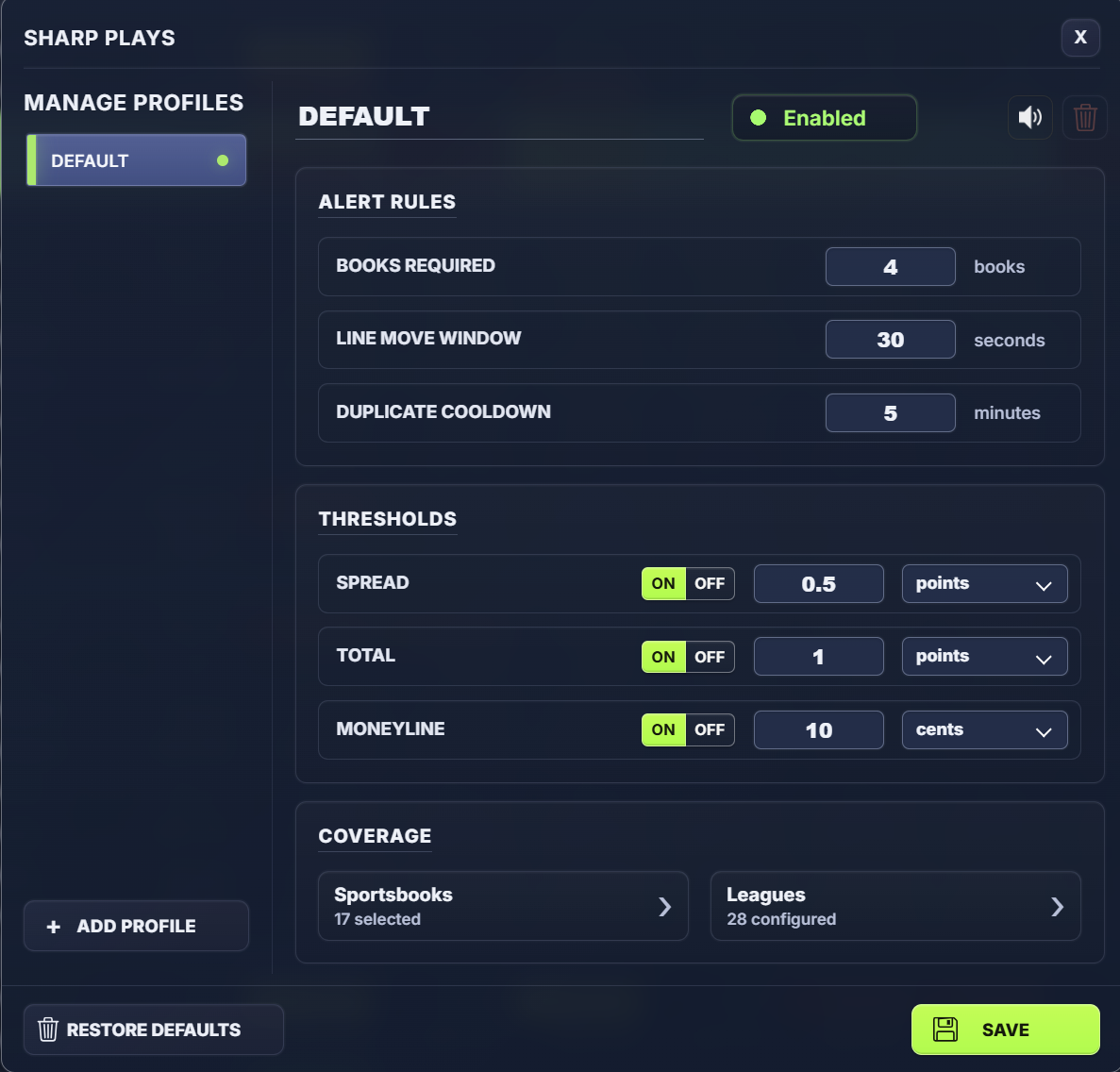
Under Alert Rules, choose what must happen before OddsLogic generates an alert:
- Books Required - The number of monitored sportsbooks that must move in the same direction.
- Line Move Window - How quickly those sportsbooks must move for the play to qualify.
- Duplicate Cooldown - How long OddsLogic should wait before generating another alert for the same play.
Example: Set Books Required to 4 and the Line Move Window to 30 seconds to look for four monitored sportsbooks moving together within 30 seconds.
2. Set Your Movement Thresholds
2. Set Your Movement Thresholds
Use Thresholds to determine how large a move must be before it qualifies.
Thresholds can be configured separately for:
- Spread
- Total
- Moneyline
You can measure movement using absolute values, such as points or cents, or use a percentage-based threshold.
TIP: Use Percentage-Based Thresholds
Percentage-based thresholds generally provide a better reflection of the significance of a line move. A fixed move in points or cents can represent very different amounts of market movement depending on the starting price. Percentage-based thresholds help normalize those differences across different odds and markets.
This lets you decide how sensitive your Sharp Play alerts should be.
3. Choose Your Sportsbooks
3. Choose Your Sportsbooks
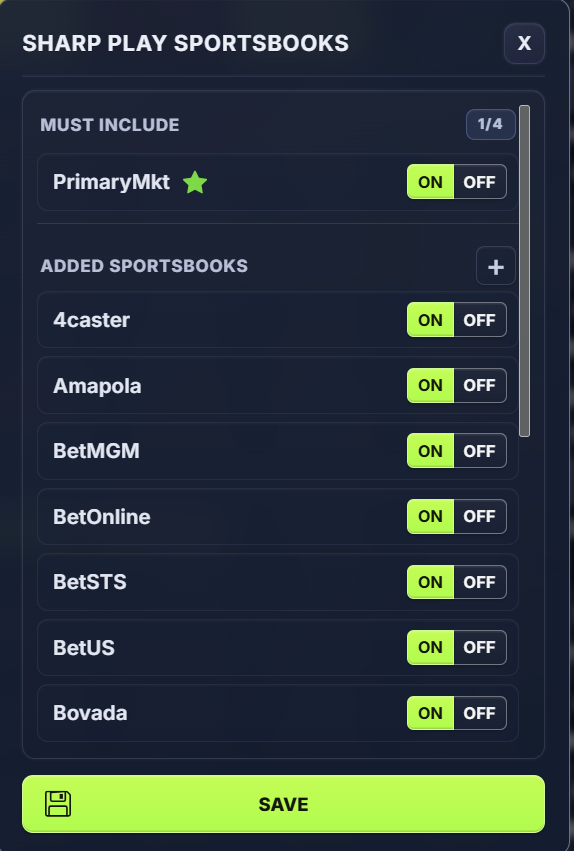
Open Sportsbooks under Coverage to select the books OddsLogic should monitor for this profile.
The more sportsbooks you include, the larger the pool OddsLogic can use to identify coordinated market movement.
TIP: More Sportsbooks Isn't Always Better
Selecting too many sportsbooks can create false or less meaningful Sharp Play alerts. We recommend starting with approximately 10–15 sportsbooks that provide a good representation of the market.
How to Set Must Include Sportsbooks
How to Set Must Include Sportsbooks
To designate a sportsbook as Must Include, move your mouse over the sportsbook and click the star icon that appears next to the book name.
Once selected, the sportsbook will move into the Must Include section. A Sharp Play will only trigger when that sportsbook is one of the books participating in the line move.
To remove a sportsbook from Must Include, click the star again to deselect it. The sportsbook will return to your regular Added Sportsbooks list.
TIP: Keep Must Include selective. We recommend using only 1–2 Must Include sportsbooks. Every Must Include book must participate in the move for the Sharp Play to trigger, so selecting too many can significantly reduce the number of alerts you receive.
4. Choose Your Leagues, Markets & Segments
4. Choose Your Leagues, Markets & Segments
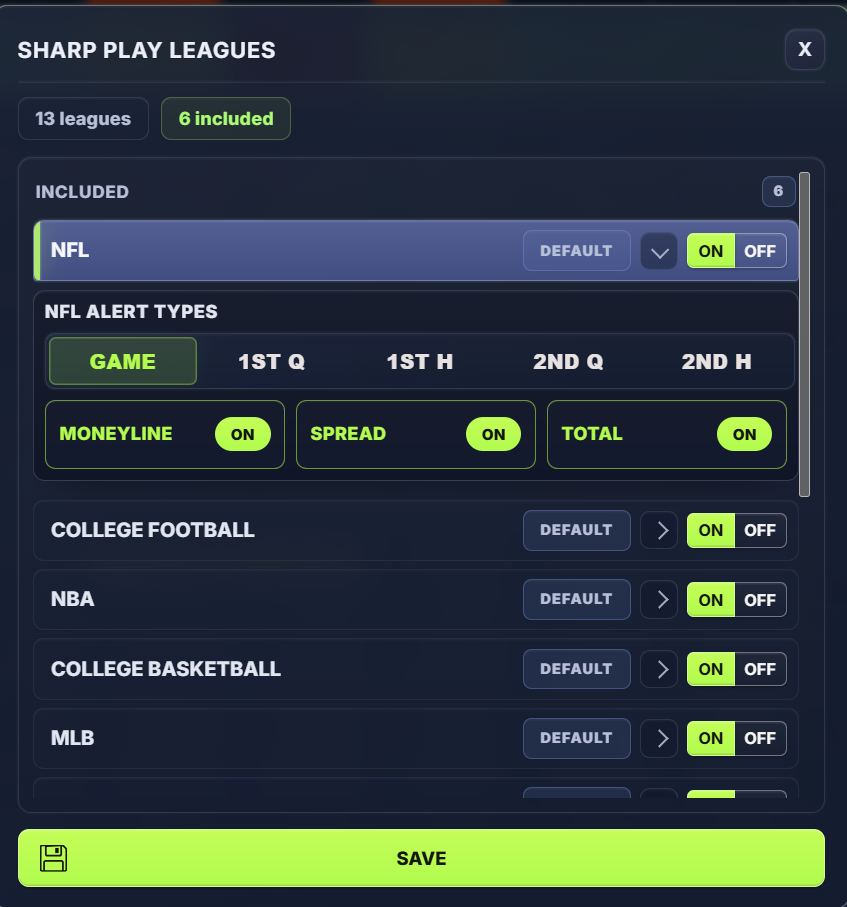
Open Leagues to control exactly what types of plays you want to monitor.
Turn individual leagues ON or OFF, then expand a league for more control.
For each league, you can include or exclude specific:
- Markets - Moneyline, Spread, Total
- Game segments - Game, 1st Half, quarters, halves, and other available segments
For example, you could monitor NFL full-game Spreads and Totals, while excluding Moneylines and 1st Quarter markets.
This allows one Sharp Play setup to cover multiple sports while still being tailored to the markets that matter to you.
Advanced: Create Multiple Sharp Play Profiles
Advanced: Create Multiple Sharp Play Profiles
You aren't limited to one Sharp Play configuration.
Profiles allow you to create completely different Sharp Play strategies with their own sportsbooks, rules, thresholds, leagues, markets, and segments.
For example, suppose your Default profile works well for most sports, but you want different settings for the NBA.
Create a new NBA Sharp Plays profile, turn NBA ON in that profile and OFF in your Default profile. You can then configure different:
- Sportsbooks
- Books Required
- Line Move Window
- Movement thresholds
- Markets and game segments
OddsLogic will monitor each profile using its own rules.
A Simple Starting Point
A Simple Starting Point
If you're setting up Sharp Plays for the first time, keep it simple: select a good group of sportsbooks, choose the number of books that must move, set your movement window and thresholds, and select the leagues you follow.
Once you're comfortable with the alerts you're receiving, use Must Include books, league-level market settings, and additional Profiles to fine-tune exactly what OddsLogic considers a Sharp Play.
When a Sharp Play Is Triggered
When a Sharp Play Is Triggered
When a play meets the rules you've configured, OddsLogic displays a Sharp Play popup directly on your odds screen, allowing you to immediately see the market movement without leaving your current View.
The alert shows the key details of the move so you can quickly evaluate the play and take action if appropriate.
Review Your Sharp Plays
Review Your Sharp Plays
You don't have to catch every popup as it happens.
Click the Sharp Plays icon in the OddsLogic toolbar at any time to view your Sharp Plays and review the alerts that have been generated.
TIP: Let OddsLogic Monitor the Market
Once your profiles are configured, Sharp Plays continuously monitor your selected sportsbooks, leagues, markets, and segments using your rules. You can continue using the odds screen normally and let OddsLogic bring significant market movement to your attention.